
Contacts cleanup
Merge Duplicate Contacts on iPhone
Years of phone switches, iCloud syncs and messenger imports leave you with three cards for one person.
Get it on the App Store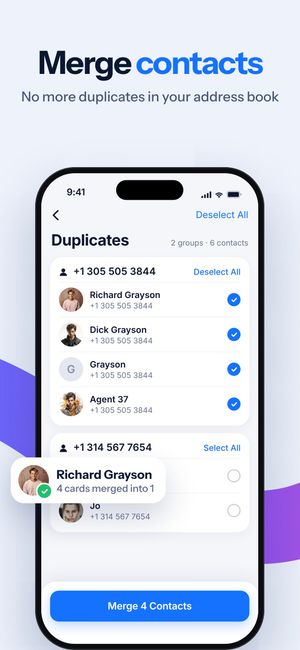
What it does
- Duplicate names, numbers and emails — grouped so you see which cards describe the same person.
- Merge several cards into one, keeping all numbers and emails.
- No name / no number — contacts that are just a number or just a name, easy to review and remove.
How it works
- Open Contacts Cleanup and allow access to contacts.
- Review the groups.
- Tap Merge or Delete. Changes go through iOS Contacts and sync to iCloud.
Questions
Does merging contacts free up storage?
Barely — contacts are tiny. It’s about a cleaner address book, not space. Photos and videos are where the space is.
Can iOS merge duplicate contacts itself?
Since iOS 16, the Contacts app can show “Duplicates Found” for exact matches. Clear Cleaner also catches the same number under different names and contacts with missing fields.

Do it for the whole library
Clear Cleaner finds duplicates, similar shots and heavy videos across your iPhone and compresses the videos you keep. Nothing is deleted until you confirm.
More in Clear Cleaner
Duplicate & similar photosGroups near-identical shots, marks the best one, deletes the rest after you confirm.Videos cleanupSee how much each video weighs, spot similar clips, pick what to delete or compress.Video compressorThree quality levels, the new size shown up front, original date and albums kept.Smart CleanOne scan across photos, screenshots and videos with the total you could free.Private FolderPersonal photos and videos behind Face ID or a passcode.