
Duplicate & similar photos
Delete Duplicate and Similar Photos on iPhone
Burst-like series, retakes and saved copies pile up fast. Clear Cleaner groups them so you keep one good shot instead of five.
Get it on the App Store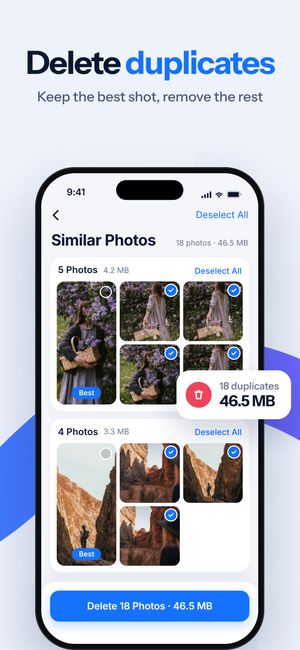
What it does
- Exact duplicates — the same photo saved twice, from messengers, AirDrop or edits.
- Similar photos — retakes of the same moment. Every group gets a “Best” pick based on sharpness and quality; you can choose another.
- Similar Live Photos — Live Photos carry a short video and weigh more, so they get their own list.
- Screenshots — collected in one place, because most of them are needed for a day.
How it works
- Open Photos Cleanup and let the scan finish — it runs on the iPhone; photos aren’t uploaded.
- Review each group. Everything except the “Best” shot is pre-selected; tap to change.
- Tap Delete. iOS asks you to confirm, and deleted photos stay in Recently Deleted for 30 days.
Questions
Does Clear Cleaner delete photos without asking?
No. You review every group, and iOS shows its own confirmation before anything is deleted. Deleted items stay in Photos → Recently Deleted for 30 days.
Isn’t this what the Duplicates album in Photos does?
Partly. Since iOS 16 the Photos app finds exact duplicates. It doesn’t group near-identical retakes or suggest a best shot — that’s most of the savings in a typical library.

Do it for the whole library
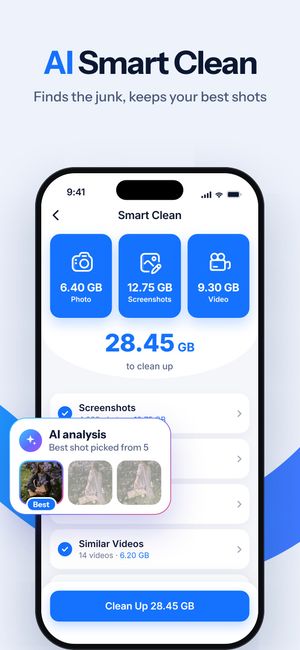
Clear Cleaner finds duplicates, similar shots and heavy videos across your iPhone and compresses the videos you keep. Nothing is deleted until you confirm.
More in Clear Cleaner
Videos cleanupSee how much each video weighs, spot similar clips, pick what to delete or compress.Video compressorThree quality levels, the new size shown up front, original date and albums kept.Contacts cleanupSame name, number or email — merged into one card. Plus empty and incomplete contacts.Smart CleanOne scan across photos, screenshots and videos with the total you could free.Private FolderPersonal photos and videos behind Face ID or a passcode.