
Private FolderPremium
Private Folder — Hide Photos Behind Face ID
Some photos shouldn’t sit in the main library where anyone scrolling your phone can see them.
Get it on the App Store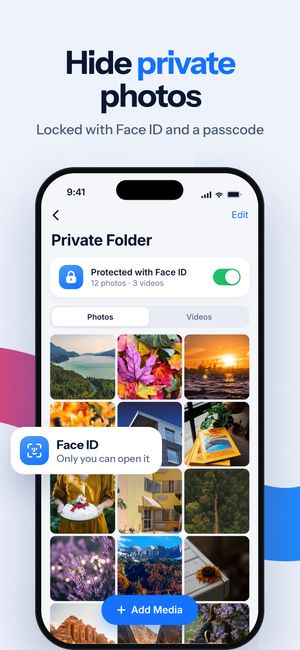
What it does
- A separate folder for photos and videos inside the app.
- Locked with Face ID or a passcode — only you can open it.
- Changing the unlock method requires the current passcode.
How it works
- Open Private Folder and set a passcode.
- Turn on Face ID if you like.
- Tap Add Media to move photos and videos in.
Questions
Is Private Folder free?
No, it’s part of Premium. See pricing.
Does it free up space?
No — it’s about privacy, not storage. The files are kept on your iPhone, inside the app.

Do it for the whole library
Clear Cleaner finds duplicates, similar shots and heavy videos across your iPhone and compresses the videos you keep. Nothing is deleted until you confirm.
More in Clear Cleaner
Duplicate & similar photosGroups near-identical shots, marks the best one, deletes the rest after you confirm.Videos cleanupSee how much each video weighs, spot similar clips, pick what to delete or compress.Video compressorThree quality levels, the new size shown up front, original date and albums kept.Contacts cleanupSame name, number or email — merged into one card. Plus empty and incomplete contacts.Smart CleanOne scan across photos, screenshots and videos with the total you could free.